Chart FX for WPF
How to Obtain a Public Key Token
As explained in our Chart FX for WPF Deployment page,
the deployment license is tied to the application through the public key token of
its signature. For that reason you will be required to sign your application for
deployment and to provide your public key token when requesting a new deployment
license. Below you will find instruction on how to create a new strong name signature
or how to extract the public key token from your existing signature file.
Generating a New Signature
To generate a new signature, you need to use the strong name key generator available
in the corresponding framework installed on your machine. This program is included
with Visual Studio and it can be found in the following location:
-
Visual Studio 2005
C:\Program Files\Microsoft Visual Studio 8\SDK\v2.0\Bin
-
Visual Studio 2008
C:\Program Files\Microsoft SDKs\Windows\v6.0A\bin
To generate the token, type the following command while residing at the above path:
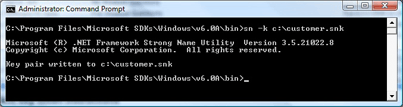
sn -k c:\customer.snk
This generates a random strong name key which includes both the private and public
keys requiring for signing an assembly and places this key on the root directory
of the C: drive for convenient access.
Note: This file should be guarded and should not be made available
publicly.
Extracting the Public key Token from an Existing Signature
You can now extract the public key token from your strong name file by using sn.exe
again as follows:
First extract the public key:
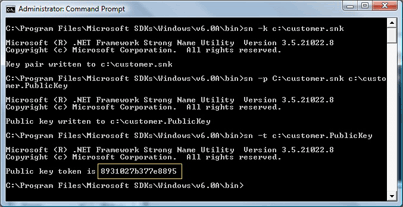
sn -p c:\customer.snk c:\customer.PublicKey
Then extract the token for that public key by using the following code:
sn -t c:\customer.PublicKey
The following screenshot demonstrates this process. The yellow square marks a sample
public key token.
Note: You may already have a signed assembly. You can extract the
public key token from this assembly by running the following command:
sn -T assemblyName.dll
Promotions
New Version 8.1 Released
Test Drive Chart FX for WPF and WIN!

 Think you have what it takes to win? Well, this is your chance to prove it! Submit your charts built using Chart FX for WPF and Visual Studio 2010 and you will be automatically entered for a chance to win a FREE Amazon Kindle. Winners will be announced via email. To participate, simply Send us your best looking Chart FX for WPF charts.
Check Out Chart FX for WPF in Action!
Silverlight Products

The Chart FX Silverlight Add-On extends Chart FX 7 and allows developers to add Chart FX functionality to their Silverlight web applications.
WPF Community Blog
Chart FX for WPF Resources

Visit our blog to read the latest posts on Chart FX for WPF and its groundbreaking technology.

Interact with the Chart FX for WPF Demo Application used in Tim Huckaby's presentation at TechEd 2008.
Note: .NET 3.0 is required to run this sample.
Download the latest .NET Framework which supports WPF development.